Wednesday, December 17, 2008

Google Picasa 3.1 released (Latest Update)

Google Picasa 3.1 Update released

Google has released a new update for Picasa 3.0.Its now makes the application in 32 languages and some minor changes to the previous 3.0 version.The new version is Picasa 3.1 Build 70.71 .
The auto update option is given to all the picasa 3.0 users and will be automatically detected if you have logged in to picasa webalbums inside Picasa.or you can get the latest version at Google Picasa 3.1 Version .

Friday, November 14, 2008

Setting up Gmail voice chat

Setting up Gmail voice chat

Frankly I never expected this.I know Google was implementing video chat in their Gtalk application and I tested it when the BETA came with Gtalk Labs edition .
Let me explain what they have implemented now.Gmail team has added a feature of having video conference ( with voice ) inside any internet browsers within Gmail.And I will recommend you to test this cool feature and see the great development effort of Google developers.They have really done a great job in implementing video streaming through AJAX within a browser.
Steps of setting up
The best shortcut way is to Install the Gmail activex through this link (Press the Get Started).You can also reach the same page through the shortcut in Gchat window shown in the picture below.


Install Gmail voice chatInstalling Gmail Voice chat Activex

It's a 20 seconds installation and once completed close the browser window and start it again .Now goto Gmail.com and you can see the new icon of voice chat with your name .And if you don't see the same icon in your friend's name , Please send this blog link to them :) .

Wednesday, November 05, 2008

CNN implements HOLOGRAM

This was the first time CNN tried Hologram technology to show only the body of the presenter even she is in the middle of a big crowd.She is shot by almost 35 HD cameras and only the body is sent to the studio.Really amazing.


And I am Happy to know that this technology was developed by Cisco india .Watch tis video too .

Tuesday, October 14, 2008

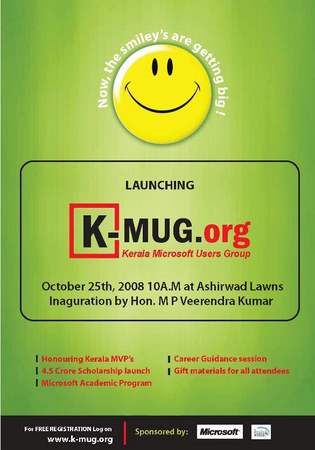
K-MUG to be launched on Oct 25th

Kerala Microsoft User Group

I remember when I started coding , how much Trivandrum Microsoft User group(T-MUG) helped me in getting my queries answered.And I am even more happy that its growing and rechristened to Kerala Microsoft User Group (K-MUG) .I will miss the inauguration ceremony but recommending all my friends/IT guys to make it to the opening ceremony and get to know more about the group operations and benefits you can get from the group.Also Wishing all the best to Sreejumon and my fellow group members who made this happen.

Related Posts

Sreejumon's KMUG post
Anuraj's KMUG post
Shiju Varghese's KMUG post
Praveen's KMUG post
Prajeesh's KMUG post

Tuesday, September 23, 2008

Tmobile Launches G1 with Google

Tmobile Launches G1 with Google

T Mobile together with Google launched the new smart phone trademarked as Tmobile G1  this morning .Looking at the initial videos I don't find much features to be boasted about and can't say it can affect Iphone market as of now .May be if the android market (Place where the Android applications can be downloaded and installed , same as IPhone 'AppStore') adds some innovative applications.Some insights that I saw on this new Phone over Iphone .
  • Google maps Street view 
  • 3 MX camera
  • More linked with Google Applications 
  • A sliding big screen which makes way to a QWERTY keywboard
  • Better 3D rendering .We can expect more high graphics games (Like Unreal etc) in cell phones soon
It lacks 
  • The sleek looks which Iphone has.This really looks like a usual phone.

Monday, September 22, 2008

Google Android powers DREAM

Its a nightmare to Apple Iphone and to so extend to me too as I just got my new IPHONE 3G a week back .And the big guy to scare the emerging company is none other than Google. Google's mobile operating system "Android" will be first launched in a HTC made smartfone named "Dream".And for no sure its a nightmare to Apple Iphone.Tmobile is the carrier who is going to support the new phone with increasing the  number of cities which has its 3G network support.
Google Androind in HTC's Dream

The first phone will be launched tommorow (23rd september 2008 ) and will be in market on mid october this year.Lets wait for more insights tommorow and I will write more on it soon .

Here are the links to some of news item linked to the big dream.

Tuesday, September 02, 2008

Google Chrome - A cool internet browser

Today Google launched a new open source internet browser called Google Chrome .I just tried it and again they have come up with a clean and simple application. I could point out a lot similarities to Mozilla Firefox 3 and can find Google has added the Fast dial , an add-on in Firefox as a default feature. I still feel it helped me a lot in saving time when I visit some frequently accessed websites at work or home .

Google Chrome - The Ultimate internet browser

Some of the reasons that I think why Google has launched Chrome are :
  • Be part of the browser industry .(Beware Mozilla and Microsoft , am sure they will add more innovative features and options)
  • To get some more data on what public is searching in Google search and use that data to make their search engine even better. (Matt Cutts says its NO But I can't believe as of now )
Some of the features that seems to be good are:

  • A good combination of short cuts and makes us easy to navigate around with fast accessibility for frequently used features.
  • Its fast .They have built a new JavaScript engine called V8 that helps in loading the web 2.0 websites faster.
  • Each tabs are treated as different processes running under a hood so if one tab or web page in that tab is crashed it won’t affect the other pages which is already loaded in other tabs
  • The built-in Google suggest feature when we start typing a website name in address bar even when we don't have that entry in our system history.
It’s worth putting some time for a try and I am sure they will come up with new and more innovative features. The installation is fast and simple. Get the browser at Google Chrome .

Thursday, August 28, 2008

Google Map Maker for India

I am really happy with the Google India team who has come up with a new tool called Google map maker which enables us to add correct points of interests in and around Indian cities.I think this is the only way to have setup Google Maps for countries where the government doesn't have enough data about the city and various points of interests.
I think its really innovative by the developer from the Google India team who thought of this and found a collaborative way to get valuable information to the public.So if you get some time and want to spend some time in marking some correct points of interests that you know in your city , JUST DO IT .

Here is the Youtube video which describes the product , straight from the creators.

Wednesday, July 23, 2008

Google Knol - Competetion to Wikipedia Encyclopedia

Knol - Competetion to Wikipedia Encyclopedia


Google is ready to compete with Wikipedia with their new invention "Knol ".They call a 'knol' as a unit of knowledge and is authoritative articles about specific topics.They launched the service to the public from today and can expect some good articles coming up in the coming days.
At a quick glance on the site , these are the first impressions I can draw from my understanding
  • It will compete well with Wikipedia as its moderated well and the authors are well recognized.Wikipedia always has the impression to some public that its wrong information dumped or sometimes for easy publicity or may be one sided articles.
  • It gives the options of getting revenue for the authors through Google ads that the authors can place near the articles and the revenue shared by Google and the author.This can attract more good writers and makes them think worth putting some good time for good writing.
  • Google can put enough authors to moderate each articles and remove discrepancy when it comes.Wikipedia is now working on putting editors to debate on articles found problematic or one sided but I have no idea how far it will be successful when you get the same guys who write or mislead the wiki as editors or debaters .
As of now I can find good number of valid and informative medical articles which each of us needs to know and they are descriptive too.Much of the articles are written by good authors and that really gives a good first impression for the public .
But I am not sure how are they going to deal with duplicate materials and marketing articles.May be I will have a next level blog on how things are working after its grand opening to the public today.

Monday, July 07, 2008

My Favorite Addons for Firefox 3

I hope you have downloaded Firefox 3 now and if it’s a NO , find the link in here and download it now.
I am much impressed by the new Firefox browser mostly because its fast,its good looking and have a bunch of add-ons supporting it. Let me share some add-ons that I use and recommend .


Better Gmail 2

Better Gmail addon for Firefox by Ratish Naroor

It really gives a new look to the usual Gmail and making it trendy.I started loving it and I really miss the interface when I am using Gmail in any other machine..Try it out now and let me know how it is.Have a look at my screen shot.
Better Gmail addon for Firefox 3 by Ratish Naroor

Colorful tabs
It gives each tab that you open , a different color and distinguish each other .

Fast Dial
This add-on has really helped me in my daily work routine. It adds shortcuts to the more frequently websites that you visit . When you open a new tab the page contains all shortcuts to your favorite websites and makes your way easy. See the screen shot .

Fast Dial addon for Firefox 3 by Ratish Naroor

And Ofcourse Google toolbar

Labels: ,

Thursday, June 26, 2008

Managing your favorite blogs using RSS Reader

I know lot of my friends who have not heard of RSS readers or may be heard but never tried. I thought I should write something so that somebody will start understanding the importance and the way how to setup and use it, which is very easy.
First, let me make it clear why RSS atoms where introduced, Say you came up with an interesting blog and would like to know when the next the blog is updated. RSS feeds is an easy mechanism of sharing a link which can be added to an RSS readers and latest blog entries will be automatically loaded when you login to your reader.
I personally use Google Reader and I recommend each and everyone to start using it. It really helps in keeping track of the changes happening in this fast technical world and of course what your favorite blogger is writing about.
Also most of the blogger add a SUBSCRIBE button in their blog somewhere so that it will automatically allow a reader to add the blog’s RSS to his RSS reader. For eg , You can see the subscribe button in all my blogs on the right hand side and allows my readers to subscribe to my blogs .
So if you have not tried yet, just click the following link and add the RSS reader to your Google Account.

How to use RSS Readers

Shoot me a mail if you have any queries.
Happy Online Reading.

Tuesday, June 24, 2008

Firefox 3 sets world record

The mighty Mozilla Firefox 3 has been released and set a world record of highest software downloads in a single day. I too participated on June 17th and was one among the 8 million users who downloaded it .
Firefox 3 downloads world record record

And now the download count has reached 19 millions.

If you have not downloaded it yet , Download it here

Wednesday, June 04, 2008

Yellow background text boxes - Its Google Toolbar

I was really surprised to see in some registration pages that some of the text boxes having a yellow background color .I had come across that long time back too when I was designing some aspx pages with form input tags and today I really went into it to find out .
Google came up with Google Toolbar sometime back and they have an option of AutoFill.You can fill in all the basic information like Full Name , address ,City,State ,Zipcode etc , all the basic and common form fields that you usually see when you go for some site registration form.Google Toolbar collects the information (saves it in some secret place in your machine ... Will put some time to find out where) and next time you visit an ordering form / registration page , it will find out which all INPUT tags with id named as City ,State,Full name etc , It gived you an option of autofilling it by just clicking 'Auto Fill' in the Google Toolbar .It really helps you when you are a person who registers to all social media / networking websites or buy too many things from different online shopping websites.
To modify/edit some information you have already saved , Goto Settings (extreme right of the toolbar ) and modifying autofill text boxes.
Its really a cool option and I recommend all web developers to name the text boxes as it is (Like city, Name etc ) so that your visitors can make use of the cool option from Google Toolbar and perform registartion faster.

Saturday, September 29, 2007

Cool Commands for Visual Studio 2005

Recently came to read about a set of tools developed by Gaston Milano called Cool Commands .It has lots of add on features for Visual Studio 2005 which can be help full for developers .

Some of the uses are ::

• A multi project reference manager
• Collapse/expand all projects
• Contextual command-prompt-here in your solution
• Open project folder
• Different options to change font sizes

Install the setup and you can new options when using Visual Studio,


You can download the setup file from http://download.deklarit.com/files/gmilano/CoolCommands30.msi .

Friday, July 06, 2007

Static in C#.net

The static keyword is used to have static data members and function members in the C# code .There can be a situation when we require to have a field in the class which is used to store some global value .Which doesn’t change and can be used as global variable .
We can also have a static constructors where we can initiate the value for the static data members used in the class.
We also make use of static methods in C# .The conditions when using a static method is that it should not use the instance variable or any instance methods in it .

Code samples :

class StaticExamples
{
public static string name; // Static field
public static uint age; // Static field
public static uint retirementAge; // Static field
public int salary; // Non Static field
public int tax; // Non Static field
static StaticExamples() // Static constructor
{
name = "naroor";
age = 25;
retirementAge = 58;

}
// Static method
public static uint GetRemainingYears(uint age,uint retirementAge)
{
return retirementAge - age;
}
}

Usage ::

MessageBox.Show("First static field ::" + StaticExamples.age.ToString());
MessageBox.Show("Second static field ::" + StaticExamples.name);
StaticExamples StaticObj = new StaticExamples();
StaticObj.salary = 20000;
StaticObj.tax = 5000;
MessageBox.Show("First Non static field :: " + StaticObj.salary.ToString());
MessageBox.Show("Second Non static field :: " + StaticObj.tax.ToString());

uint age;
age = StaticExamples.GetRemainingYears(StaticExamples.age, StaticExamples.retirementAge);
MessageBox.Show("The retirement age for " + StaticExamples.name + " is " + age.ToString());

So you can find that for calling static field and static methods we don’t have to instantiate a method of the class.

Monday, May 21, 2007

'DNT HATE MOZILLA BUT USE IE OR ELSE' Error - Mozilla Issue

This is the second time that I got the attack from the Worm called w32.USBworm .Its a new worm which gets propagated from USB drives.Once the drive is infected it infect the machines which auto plays the USB drive .
You can find whether your machine is infected when you get a message box saying I “DNT HATE MOZILLA BUT USE IE OR ELSE… ” with the messagebox title “USE INTERNET EXPLORER YOU DOPE” .It will also ban you in accessing orkut and you tube website.
Solution ::
The machine will have a hidden folder c:\heap41a. The folder will have some files which includes the script files which is running and creating the issues (invoking the message boxes too) .
Start the XP machine is safe mode. Run regedit .Change the following setting to 2 from 1 . HKEY_LOCAL_MACHINE\SOFTWARE\Microsoft\Windows\CurrentVersion\Explorer\Advanced\
Folder\Hidden\SHOWALL .This is done because some of the machines don’t show the folder.
Next delete the folder c:\heap41a .
Now clear all the entries which has heap41a in it , in the registry directory HKEY_LOCAL_MACHINE,SOFTWARE\Microsoft\Windows\CurrentVersion\policies\Explorer\Run .
Now your machine is 100% clean from the infection. Be cautious the next time you use the infected USB drive .We can hope a tool to solve this issue soon …
The things that I have done with my USB stick is , I disable the autoplay for all drives in my PC .You can do it by Run > gpedit.msc .Go to Computer Configuration > Click “Administrative Templates” > Click “System” > Double-Click “Turn off Autoplay”
Change it to all drives .Now the USB drive is safe for that machine .Also delete the extra files created in the USB drive if any.

Thursday, December 14, 2006

Microsoft XPS format | threat to Adobe PDF

At last there is somebody to compete adobe’s PDF format .Microsoft has come with there own new royalty-free technology called XML Paper Specification (XPS) which will be their future specification for document viewing and creating .This will be shipped with Microsoft VISTA .We can say that this specification can be one of the competitor for the Adobe’s PDF format for document creation and reading.
For more details, click here .

Thursday, October 12, 2006

Use your Gmail Account as your FTP site

Use Gmail's 2.7+ GB for storing/sharing files and images . Here is the link to get the addon for Mozilla Firefox.

https://addons.mozilla.org/firefox/1593/

Inside your gmail account , you can use labels to mark all the mails related to Gspace to keep it in archive.And the best method is to use the filtering option in Gmail .

Wednesday, July 26, 2006

Tried out MS Office 2007 beta 2

Tried out MS OFFICE 2007 beta 2.Overall MS has made lots of changes and given a new oveall look for the interface .The menu's have been taken off and replaced with tabs ,good commenting options ,New fonts etc .Anyway it will really take time to get used to all the new features of ths MS Offcie 2007 .Here is a screenshot .
MS Word 2007 beta 2

Sunday, July 16, 2006

Phishing - the new threat on internet

Phishing (pronounced as 'Fishing') is going to be a future threat on the internet .The idea behind this is designing phony websites designed for a branded company and stealing your personal and valuable information .
Usually the phishers will send you email messages which will have links to fraudulent websites which will ask for your CC details .The sites will have the logos and look like you have reached the official page .
I recommend you to use the new Internet explorer 7 which have a built-in phisher filter which will always look for phishers behind any website .